Unified admin hub
A separate admin for every system? Admux brings them into one place.
Admux connects directly to the database behind each of your systems: sales, inventory, CRM, payments. Your teams look up, update and control all operational data on one platform, with one sign-in, one permission model and one audit log.
- Many databases, one place to manage them
- One permission model for every system
- One audit log for every action
Connects to
- PostgreSQL
- MySQL 8
- SQL
- JavaScript
- React + TSX
- Cron
- SOURCE sales · PostgreSQL · prod ✓
- SOURCE inventory · MySQL 8 · prod ✓
- RUN find-orders · env=production · ✓
- DENY delete-order · role=viewer · logged
- JOB payment-reconciliation · cron 0 1 * * * UTC
- SOURCE sales · PostgreSQL · prod ✓
- SOURCE inventory · MySQL 8 · prod ✓
- RUN find-orders · env=production · ✓
- DENY delete-order · role=viewer · logged
- JOB payment-reconciliation · cron 0 1 * * * UTC
- SOURCE sales · PostgreSQL · prod ✓
- SOURCE inventory · MySQL 8 · prod ✓
- RUN find-orders · env=production · ✓
- DENY delete-order · role=viewer · logged
- JOB payment-reconciliation · cron 0 1 * * * UTC
The problem
Ten systems, ten admin panels, and nobody sees the whole picture
How it works today
- Sales, inventory, CRM and payments each have their own admin panel, built and maintained by different teams.
- Staff juggle several accounts, and access is granted and revoked separately in each place.
- Looking up one order means opening three tools and piecing the results together by hand.
- Activity logs are scattered, so it is hard to tell who changed which data, in which system.
With Admux
- The databases of every system connect to one place, each with its own settings per environment.
- One sign-in and one permission model cover every operation.
- One screen can combine data from several sources, and a JavaScript action can coordinate work across systems.
- Every execution, on every data source, lands in the same audit log.
How it works
Three steps to bring every system into one admin hub
No changes to the systems you already run: Admux works directly on the databases they use today.
- STEP_01
Connect your data sources
Add the PostgreSQL or MySQL database behind each system, with separate settings for dev and production. Browse each source’s tables and relationship diagram in the browser.
- STEP_02
Define operations
Write parameterized SQL actions on each source, or JavaScript actions that call several actions to handle work spanning multiple systems. Actions are checked at publish time and versioned.
- STEP_03
Manage it all in one place
Authorized users work through generated forms or screens that combine data from several sources. Every operation passes through the same permission layer and the same audit log.
Features
Every data source, one shared admin layer
Connections, permissions, execution and auditing shared across every system in your business.
-
Many data sources in one place
Connect the PostgreSQL and MySQL databases behind each system. Every source has its own per-environment settings, with TLS support for CA and client certificates.
-
Structure and diagram for each source
Tables, columns, primary and foreign keys of each data source shown as lists and a relationship diagram, without opening a database admin tool.
-
Screens that combine sources
A view calls several actions on different sources, so orders, stock and customers appear on one screen for the people who need them.
-
Cross-system operations
JavaScript actions call other actions to handle a task that spans several systems. Permission to call another action is granted explicitly.
-
One permission model
Admin, editor and viewer roles; user groups; run permission per action; access per environment. Grant and revoke in one place for every system.
-
Central audit log
Every configuration change and every execution on every data source, including denied attempts, in one log. Filter and export it for reviews.
-
Separate dev and production
Every project starts with dev and prod. New actions stay off production until enabled. The navigation bar turns red while you are in production.
-
Variables and secrets
Per-environment configuration values used directly in actions. Secrets are write-only and never shown again after saving.
-
Generated run forms
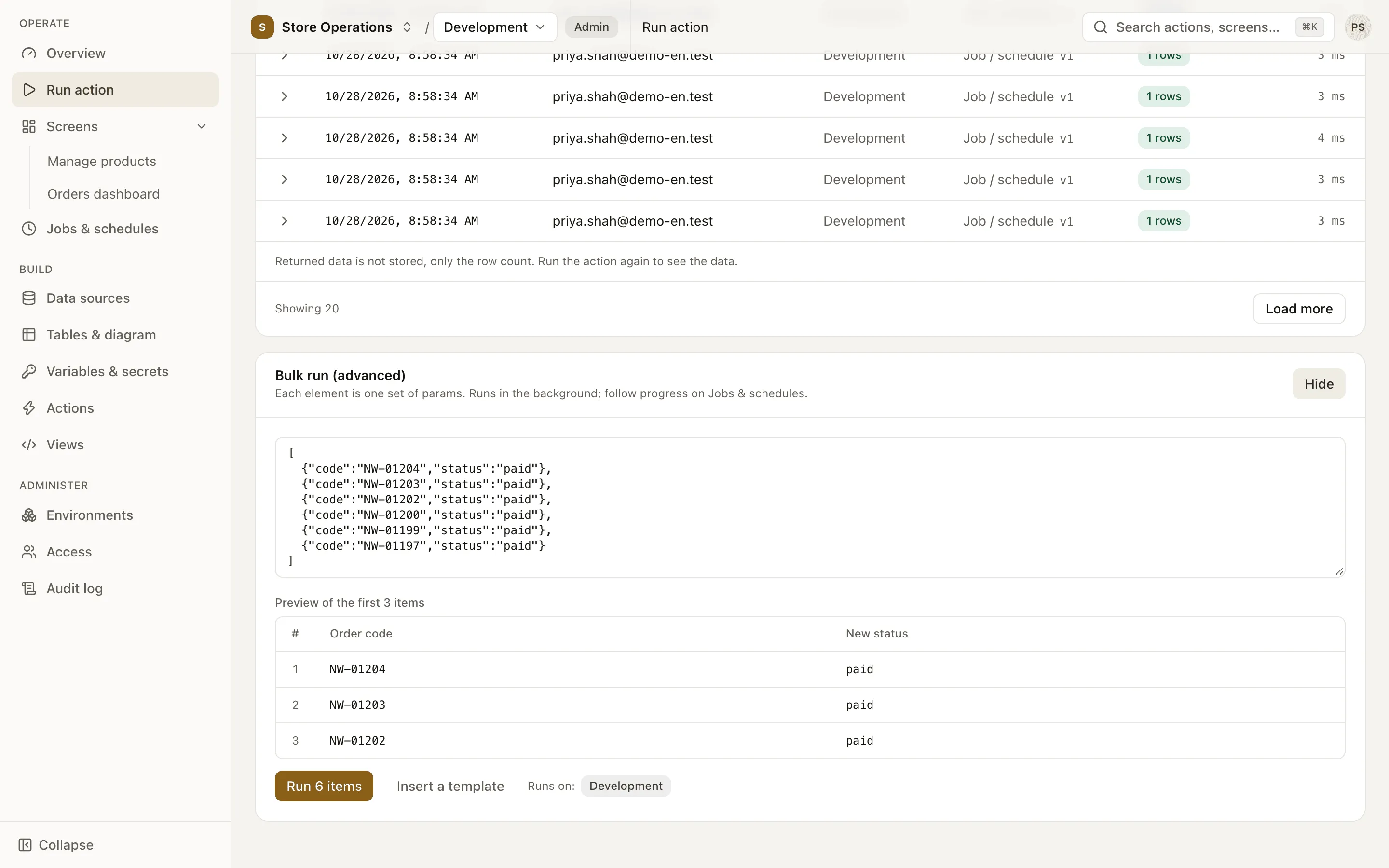
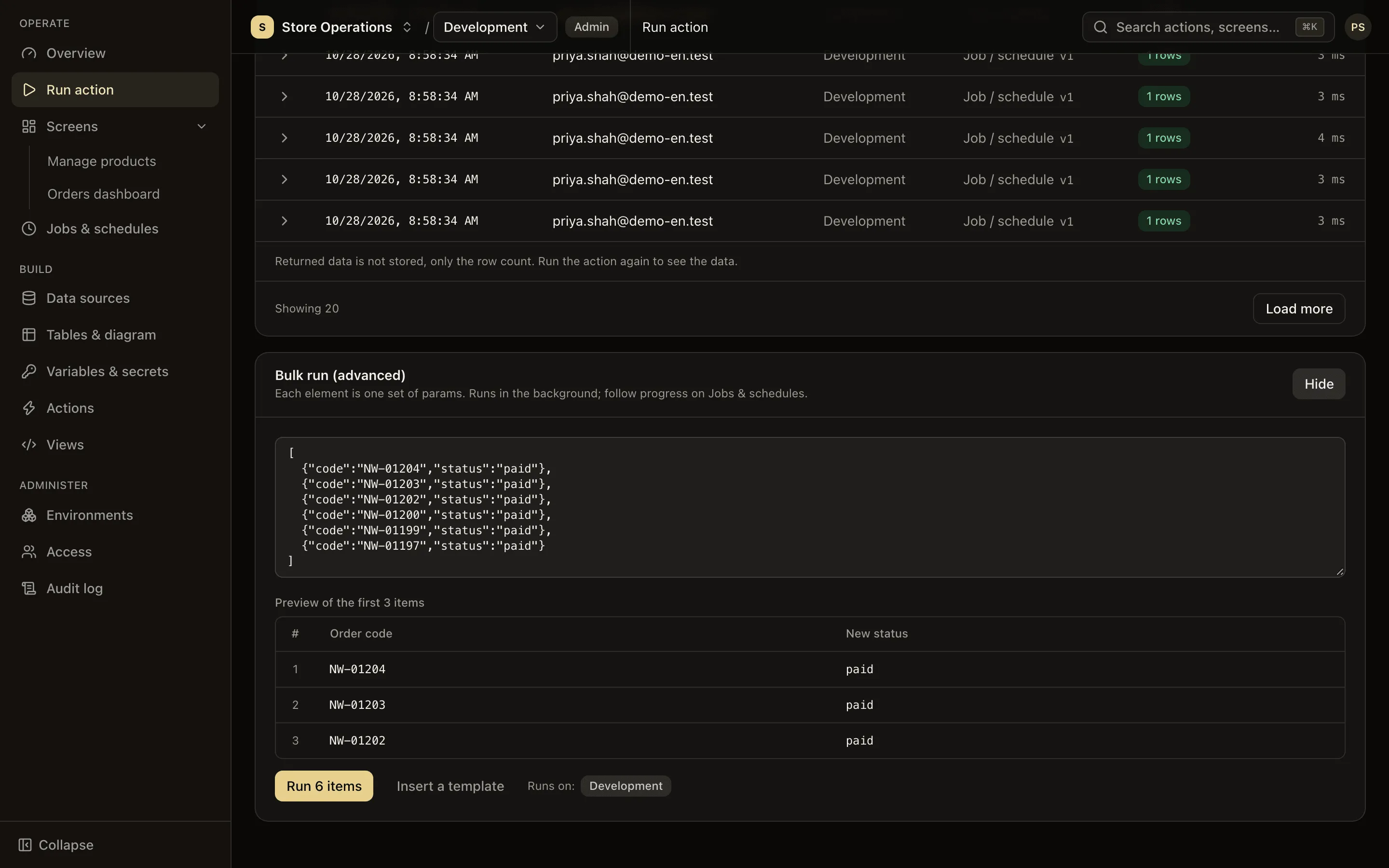
Each action gets a form built from its parameters; write actions always ask for confirmation and can run in bulk, up to 10,000 parameter sets. Results export to CSV.
-
CRUD actions from a table
Pick a table on any source to get draft list, view, create, update and delete actions for engineering to review.
-
Drafts, versions, rollback
Edits happen on a draft without affecting the live version. Every publish creates a fixed version you can compare and restore.
-
Background jobs and schedules
Track progress of long-running tasks and cancel them when needed. Cron schedules can apply to several environments at once.
Multiple data sources
The database behind each system, visible on one platform
Each system becomes a data source with its own connection settings per environment. The Tables & diagram page shows the real structure of every source, and from any table the platform generates a draft set of CRUD actions.
- PostgreSQL and MySQL 8, separate settings for dev and production
- Relationship diagram laid out from each source’s foreign keys
- Passwords are encrypted and never sent to the browser
Unified screens
One screen, data from several systems
Views are written in TSX and can call any action in the project, so one screen can put orders, stock levels and customer details side by side. Start from the drag-and-drop layout builder; after publishing, users get the new version on their next page load.
- Typed hints for every action, type-checked at publish time
- Views run in an isolated frame with the viewer’s own permissions
- Versions and rollback, just like actions
Central control
One place to see who did what, on which system, in which environment
Run permission is granted per action and per environment, the same way for every data source. Production is clearly marked. Every execution, including denied attempts, is in the same audit log.
- Open or restricted run permission per action
- IP allowlist and role cap per environment
- The log records row counts, never the data itself
Self-service operations
Business staff look up and update data without waiting on engineering
Every published action has its own run page: a form generated from its parameters, results in a table, CSV export. Engineering defines an operation once instead of building another admin page for each request.
- Write actions always require confirmation
- Bulk runs of up to 10,000 parameter sets
- Execution history kept for every action
Roles
Clear responsibilities by role
Four roles shared by every project and every data source, from organization admins to business users.
-
Owner
Runs the organization: creates projects and manages user accounts for the whole company.
-
Admin
Runs a project: members, groups, environments, data sources, deleting actions, the audit log.
-
Editor
Builds: writes actions, manages variables and secrets, builds views, creates schedules.
-
Viewer
Uses: runs permitted actions, opens screens, follows jobs. Cannot see SQL or connection details.
Security
One place for everything, so it is locked down tighter
A single place that can reach the databases of every system needs stronger protection than any standalone admin panel.
-
Encrypted connection credentials
Passwords and certificates are protected with envelope encryption (AES-256-GCM) and decrypted only on the execution server. Stored values are never returned to the browser.
-
SQL validated on publish
Parameters are always bound and never concatenated into statements. Multiple statements, DDL, and writes inside read-only actions are rejected before they reach users.
-
Custom code in a sandbox
JavaScript runs in a WebAssembly sandbox with no file or network access. Views run in an isolated iframe on a separate origin and cannot read the login session.
-
No implicit privileges
Publishing a view grants viewers no additional permissions. Users can only run actions they are personally allowed to run. Permissions are enforced at a single point.
-
Every execution logged
Each execution, including denied attempts, records who ran it, when, in which environment and with what outcome. Returned data is not stored.
-
Isolation per customer
Each customer has a dedicated environment for configuration data, encryption keys, domain and a fixed egress IP address for your database allowlist.
Use cases
One admin hub for every team
-
Customer support
Orders, payments and shipping on one screen
Agents look up a customer and see data from the sales, payment and inventory systems at once, without opening each tool. Data scope follows the permissions they have been granted.
-
Operations
Controlled bulk updates
Update thousands of records in one bulk run, with a confirmation step before writing and an audit trail afterwards.
-
Finance and data
Scheduled cross-system reconciliation
Schedule actions that total revenue and reconcile data between sources. Export results to CSV for further work in a spreadsheet.
-
Governance and security
Grant and revoke access in one place
When someone leaves, lock one account. Access to every environment and every operation is reviewed and audited centrally.
Deployment
Dedicated infrastructure for each business
Every customer runs an independent installation. Configuration data, encryption keys, domain and egress IP are never shared with other customers.
-
Isolated per customer
A separate configuration database and encryption keys for each customer.
-
Fixed egress IP
Allowlist a single IP address to let the platform reach your databases.
-
Implementation support
Our team works with you to connect the first data source and build your priority tools.
Roadmap
- Actions that call HTTP/REST APIs
- Single sign-on (SSO/SAML)
- Gateway deployed inside your VPC
- Approval before sensitive actions run
- Audit log streaming to your SIEM
FAQ
Frequently asked questions
Do business users need programming skills?
No. Users fill in a form and click Run, or open a ready-made screen. Defining actions requires SQL (or the generate-CRUD-from-a-table feature). Building custom views requires React.
How is Admux different from each system’s own admin panel?
A system’s admin panel only sees that system’s data, with its own accounts and permission rules. Admux connects the databases of many systems in one place: one sign-in, one permission model, one audit log, and screens that can combine data from several sources.
Can we combine data from several databases?
Yes. Each action runs on one data source; a view or a JavaScript action can call several actions, so one screen or one task can use data from several systems in the same project. A JavaScript action can only call another action after it has been granted permission.
Which data sources are supported?
PostgreSQL and MySQL (version 8.0 and later), each with per-environment settings and TLS support for CA and client certificates. HTTP API data sources can already store settings and test connections; actions that call HTTP APIs are on the roadmap.
Does the platform store our business data?
No. Execution history and the audit log record the user, action, time, environment, parameters (with sensitive values masked), outcome and row count. Returned data is not stored. Connection credentials are encrypted and never sent to the browser.
How do we prevent accidental writes on production?
New actions are not applied to production by default, and enabling production requires confirmation. Write actions always require confirmation before they run. Production is shown in red. Run permission can be limited to specific users or groups.
Does editing an action affect the people using it?
No. All edits happen on a draft while users keep running the published version. Each publish creates a new version, and you can restore an earlier version at any time.
What does Admux save compared with building admin pages in-house?
Engineering no longer rebuilds login, permissions, audit logging, environment management, background execution and data export for every system. Effort goes into queries and business screens, and publishing requires no build or deployment.
Is single sign-on (SSO) supported?
SSO/SAML is on the roadmap. Currently, accounts are created and managed by the organization owner, and login sessions can be revoked on every device.
How do we get started?
Book a demo. Our team will connect your test data sources with you and build your first admin screens together. The documentation describes the full workflow in Admux.
Every system in your business, managed in one place
A 30-minute demo on your own systems and business scenarios.